

Note
-
Download Jupyter notebook:
https://docs.doubleml.org/stable/examples/py_double_ml_cate.ipynb.
Python: Conditional Average Treatment Effects (CATEs) for IRM models#
In this simple example, we illustrate how the DoubleML package can be used to estimate conditional average treatment effects with B-splines for one or two-dimensional effects in the DoubleMLIRM model.
[1]:
import numpy as np
import pandas as pd
import doubleml as dml
from doubleml.irm.datasets import make_heterogeneous_data
Data#
We define a data generating process to create synthetic data to compare the estimates to the true effect. The data generating process is based on the Monte Carlo simulation from Oprescu et al. (2019).
The documentation of the data generating process can be found here.
One-dimensional Example#
We start with an one-dimensional effect and create our training data. In this example the true effect depends only the first covariate \(X_0\) and takes the following form
The generated dictionary also contains a callable with key treatment_effect to calculate the true treatment effect for new observations.
[2]:
np.random.seed(42)
data_dict = make_heterogeneous_data(
n_obs=2000,
p=10,
support_size=5,
n_x=1,
binary_treatment=True,
)
treatment_effect = data_dict['treatment_effect']
data = data_dict['data']
print(data.head())
y d X_0 X_1 X_2 X_3 X_4 X_5 \
0 4.803300 1.0 0.259828 0.886086 0.895690 0.297287 0.229994 0.411304
1 5.655547 1.0 0.824350 0.396992 0.156317 0.737951 0.360475 0.671271
2 1.878402 0.0 0.988421 0.977280 0.793818 0.659423 0.577807 0.866102
3 6.941440 1.0 0.427486 0.330285 0.564232 0.850575 0.201528 0.934433
4 1.703049 1.0 0.016200 0.818380 0.040139 0.889913 0.991963 0.294067
X_6 X_7 X_8 X_9
0 0.240532 0.672384 0.826065 0.673092
1 0.270644 0.081230 0.992582 0.156202
2 0.289440 0.467681 0.619390 0.411190
3 0.689088 0.823273 0.556191 0.779517
4 0.210319 0.765363 0.253026 0.865562
First, define the DoubleMLData object.
[3]:
data_dml_base = dml.DoubleMLData(
data,
y_col='y',
d_cols='d'
)
Next, define the learners for the nuisance functions and fit the IRM Model. Remark that linear learners would usually be optimal due to the data generating process.
[4]:
# First stage estimation
from sklearn.ensemble import RandomForestClassifier, RandomForestRegressor
randomForest_reg = RandomForestRegressor(n_estimators=500)
randomForest_class = RandomForestClassifier(n_estimators=500)
np.random.seed(42)
dml_irm = dml.DoubleMLIRM(data_dml_base,
ml_g=randomForest_reg,
ml_m=randomForest_class,
trimming_threshold=0.05,
n_folds=5)
print("Training IRM Model")
dml_irm.fit()
print(dml_irm.summary)
Training IRM Model
/tmp/ipykernel_44134/149446427.py:8: DeprecationWarning: 'trimming_threshold' is deprecated and will be removed in a future version. Use 'ps_processor_config' with 'clipping_threshold' instead.
dml_irm = dml.DoubleMLIRM(data_dml_base,
coef std err t P>|t| 2.5 % 97.5 %
d 4.475688 0.040826 109.628538 0.0 4.395671 4.555705
To estimate the CATE, we rely on the best-linear-predictor of the linear score as in Semenova et al. (2021) To approximate the target function \(\theta_0(x)\) with a linear form, we have to define a data frame of basis functions. Here, we rely on patsy to construct a suitable basis of B-splines.
[5]:
import patsy
design_matrix = patsy.dmatrix("bs(x, df=5, degree=2)", {"x": data["X_0"]})
spline_basis = pd.DataFrame(design_matrix)
To estimate the parameters to calculate the CATE estimate call the cate() method and supply the dataframe of basis elements.
[6]:
cate = dml_irm.cate(spline_basis)
print(cate)
================== DoubleMLBLP Object ==================
------------------ Fit summary ------------------
coef std err t P>|t| [0.025 0.975]
0 0.691539 0.143541 4.817705 1.452187e-06 0.410204 0.972875
1 2.301731 0.248137 9.276043 1.758890e-20 1.815391 2.788071
2 4.904926 0.161322 30.404629 4.771161e-203 4.588741 5.221111
3 4.754996 0.194172 24.488537 1.956904e-132 4.374426 5.135567
4 3.747089 0.195894 19.128158 1.471838e-81 3.363144 4.131034
5 4.314761 0.200076 21.565610 3.779005e-103 3.922619 4.706903
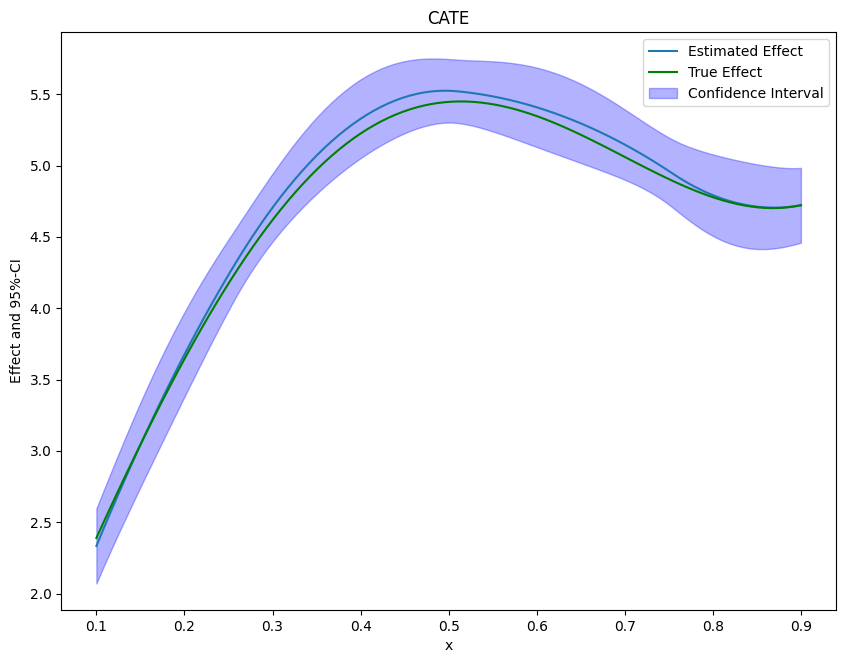
To obtain the confidence intervals for the CATE, we have to call the confint() method and a supply a dataframe of basis elements. This could be the same basis as for fitting the CATE model or a new basis to e.g. evaluate the CATE model on a grid. Here, we will evaluate the CATE on a grid from 0.1 to 0.9 to plot the final results. Further, we construct uniform confidence intervals by setting the option joint and providing a number of bootstrap repetitions n_rep_boot.
[7]:
new_data = {"x": np.linspace(0.1, 0.9, 100)}
spline_grid = pd.DataFrame(patsy.build_design_matrices([design_matrix.design_info], new_data)[0])
df_cate = cate.confint(spline_grid, level=0.95, joint=True, n_rep_boot=2000)
print(df_cate)
2.5 % effect 97.5 %
0 2.069727 2.333115 2.596504
1 2.185098 2.452716 2.720333
2 2.297139 2.570354 2.843569
3 2.406580 2.686030 2.965480
4 2.514022 2.799744 3.085465
.. ... ... ...
95 4.418277 4.705695 4.993113
96 4.424959 4.706244 4.987528
97 4.434448 4.709129 4.983809
98 4.446203 4.714350 4.982497
99 4.459541 4.721909 4.984277
[100 rows x 3 columns]
Finally, we can plot our results and compare them with the true effect.
[8]:
from matplotlib import pyplot as plt
plt.rcParams['figure.figsize'] = 10., 7.5
df_cate['x'] = new_data['x']
df_cate['true_effect'] = treatment_effect(new_data["x"].reshape(-1, 1))
fig, ax = plt.subplots()
ax.plot(df_cate['x'],df_cate['effect'], label='Estimated Effect')
ax.plot(df_cate['x'],df_cate['true_effect'], color="green", label='True Effect')
ax.fill_between(df_cate['x'], df_cate['2.5 %'], df_cate['97.5 %'], color='b', alpha=.3, label='Confidence Interval')
plt.legend()
plt.title('CATE')
plt.xlabel('x')
_ = plt.ylabel('Effect and 95%-CI')
If the effect is not one-dimensional, the estimate still corresponds to the projection of the true effect on the basis functions.
Two-Dimensional Example#
It is also possible to estimate multi-dimensional conditional effects. We will use a similar data generating process but now the effect depends on the first two covariates \(X_0\) and \(X_1\) and takes the following form
With the argument n_x=2 we can specify set the effect to be two-dimensional.
[9]:
np.random.seed(42)
data_dict = make_heterogeneous_data(
n_obs=5000,
p=10,
support_size=5,
n_x=2,
binary_treatment=True,
)
treatment_effect = data_dict['treatment_effect']
data = data_dict['data']
print(data.head())
y d X_0 X_1 X_2 X_3 X_4 X_5 \
0 1.286203 1.0 0.014080 0.006958 0.240127 0.100807 0.260211 0.177043
1 0.416899 1.0 0.152148 0.912230 0.892796 0.653901 0.672234 0.005339
2 2.087634 1.0 0.344787 0.893649 0.291517 0.562712 0.099731 0.921956
3 7.508433 1.0 0.619351 0.232134 0.000943 0.757151 0.985207 0.809913
4 0.567695 0.0 0.477130 0.447624 0.775191 0.526769 0.316717 0.258158
X_6 X_7 X_8 X_9
0 0.028520 0.909304 0.008223 0.736082
1 0.984872 0.877833 0.895106 0.659245
2 0.140770 0.224897 0.558134 0.764093
3 0.460207 0.903767 0.409848 0.524934
4 0.037747 0.583195 0.229961 0.148134
As univariate example estimate the IRM Model.
[10]:
data_dml_base = dml.DoubleMLData(
data,
y_col='y',
d_cols='d'
)
[11]:
# First stage estimation
from sklearn.ensemble import RandomForestClassifier, RandomForestRegressor
randomForest_reg = RandomForestRegressor(n_estimators=500)
randomForest_class = RandomForestClassifier(n_estimators=500)
np.random.seed(42)
dml_irm = dml.DoubleMLIRM(data_dml_base,
ml_g=randomForest_reg,
ml_m=randomForest_class,
trimming_threshold=0.05,
n_folds=5)
print("Training IRM Model")
dml_irm.fit()
print(dml_irm.summary)
Training IRM Model
/tmp/ipykernel_44134/149446427.py:8: DeprecationWarning: 'trimming_threshold' is deprecated and will be removed in a future version. Use 'ps_processor_config' with 'clipping_threshold' instead.
dml_irm = dml.DoubleMLIRM(data_dml_base,
coef std err t P>|t| 2.5 % 97.5 %
d 4.546889 0.038848 117.041816 0.0 4.470748 4.623031
As above, we will rely on the patsy package to construct the basis elements. In the two-dimensional case, we will construct a tensor product of B-splines (for more information see here).
[12]:
design_matrix = patsy.dmatrix("te(bs(x_0, df=7, degree=3), bs(x_1, df=7, degree=3))", {"x_0": data["X_0"], "x_1": data["X_1"]})
spline_basis = pd.DataFrame(design_matrix)
cate = dml_irm.cate(spline_basis)
print(cate)
================== DoubleMLBLP Object ==================
------------------ Fit summary ------------------
coef std err t P>|t| [0.025 0.975]
0 2.806423 0.142063 19.754718 7.306329e-87 2.527984 3.084863
1 -1.117313 0.831330 -1.344006 1.789464e-01 -2.746689 0.512064
2 0.460447 0.786446 0.585478 5.582263e-01 -1.080958 2.001852
3 2.311793 0.724912 3.189069 1.427317e-03 0.890993 3.732594
4 0.569626 0.739286 0.770508 4.409988e-01 -0.879349 2.018600
5 -3.330868 1.004340 -3.316474 9.116103e-04 -5.299338 -1.362397
6 -4.999860 1.105103 -4.524338 6.058472e-06 -7.165822 -2.833898
7 -6.395538 0.950542 -6.728304 1.716520e-11 -8.258567 -4.532509
8 -2.652814 0.809280 -3.277992 1.045484e-03 -4.238974 -1.066654
9 3.755919 0.854978 4.393000 1.117970e-05 2.080193 5.431645
10 -0.020815 0.725715 -0.028682 9.771179e-01 -1.443191 1.401560
11 1.584943 0.797175 1.988199 4.678972e-02 0.022508 3.147378
12 -1.079485 1.092590 -0.988005 3.231501e-01 -3.220922 1.061953
13 -2.284763 1.195057 -1.911844 5.589619e-02 -4.627031 0.057506
14 -2.614870 0.939707 -2.782643 5.391816e-03 -4.456662 -0.773077
15 0.242661 0.732196 0.331415 7.403313e-01 -1.192418 1.677739
16 1.082405 0.730715 1.481295 1.385279e-01 -0.349771 2.514581
17 3.743248 0.648070 5.775995 7.649973e-09 2.473054 5.013441
18 1.378671 0.676767 2.037144 4.163564e-02 0.052233 2.705110
19 -1.507568 0.912740 -1.651694 9.859694e-02 -3.296506 0.281370
20 -2.314102 1.014361 -2.281340 2.252832e-02 -4.302212 -0.325992
21 -2.805663 0.751840 -3.731731 1.901685e-04 -4.279241 -1.332085
22 1.939535 0.724634 2.676572 7.437967e-03 0.519278 3.359792
23 2.191670 0.754166 2.906083 3.659842e-03 0.713531 3.669809
24 4.370141 0.672014 6.503049 7.870825e-11 3.053018 5.687265
25 2.142542 0.649146 3.300555 9.649380e-04 0.870239 3.414845
26 1.705074 0.905352 1.883326 5.965620e-02 -0.069384 3.479532
27 -1.237453 0.983035 -1.258809 2.080994e-01 -3.164166 0.689260
28 -1.378932 0.849257 -1.623693 1.044414e-01 -3.043444 0.285580
29 4.055648 0.953855 4.251852 2.120098e-05 2.186128 5.925169
30 4.062594 0.886544 4.582506 4.594374e-06 2.324999 5.800189
31 6.073808 0.810632 7.492685 6.747846e-14 4.484999 7.662616
32 3.836397 0.778403 4.928546 8.284366e-07 2.310755 5.362040
33 2.582679 1.060838 2.434565 1.490970e-02 0.503475 4.661884
34 -1.841910 1.301222 -1.415523 1.569153e-01 -4.392259 0.708439
35 -0.427050 1.107490 -0.385601 6.997920e-01 -2.597691 1.743591
36 7.042455 1.009354 6.977189 3.011448e-12 5.064157 9.020753
37 5.193314 0.991053 5.240197 1.604053e-07 3.250885 7.135742
38 7.152891 0.831996 8.597263 8.163992e-18 5.522208 8.783573
39 6.735901 0.920205 7.319998 2.479750e-13 4.932332 8.539471
40 2.378457 1.183879 2.009037 4.453326e-02 0.058096 4.698818
41 4.431512 1.295005 3.422004 6.216147e-04 1.893349 6.969675
42 1.725202 1.094643 1.576041 1.150165e-01 -0.420259 3.870663
43 10.063978 1.002005 10.043839 9.779266e-24 8.100084 12.027872
44 3.729985 1.098719 3.394848 6.866670e-04 1.576535 5.883435
45 9.199427 0.696357 13.210789 7.602337e-40 7.834593 10.564262
46 5.363082 0.694356 7.723825 1.128902e-14 4.002169 6.723994
47 5.927481 0.816432 7.260223 3.864541e-13 4.327303 7.527660
48 1.304794 0.986936 1.322065 1.861466e-01 -0.629566 3.239154
49 1.234315 0.897641 1.375066 1.691111e-01 -0.525029 2.993660
Finally, we create a new grid to evaluate and plot the effects.
[13]:
grid_size = 100
x_0 = np.linspace(0.1, 0.9, grid_size)
x_1 = np.linspace(0.1, 0.9, grid_size)
x_0, x_1 = np.meshgrid(x_0, x_1)
new_data = {"x_0": x_0.ravel(), "x_1": x_1.ravel()}
[14]:
spline_grid = pd.DataFrame(patsy.build_design_matrices([design_matrix.design_info], new_data)[0])
df_cate = cate.confint(spline_grid, joint=True, n_rep_boot=2000)
print(df_cate)
2.5 % effect 97.5 %
0 1.669024 2.378474 3.087924
1 1.678781 2.365681 3.052582
2 1.695720 2.355790 3.015860
3 1.717747 2.348724 2.979701
4 1.742636 2.344408 2.946180
... ... ... ...
9995 3.712818 4.504773 5.296728
9996 3.828100 4.659269 5.490437
9997 3.935571 4.809356 5.683140
9998 4.038240 4.953175 5.868111
9999 4.138730 5.088868 6.039006
[10000 rows x 3 columns]
[15]:
import plotly.graph_objects as go
grid_array = np.array(list(zip(x_0.ravel(), x_1.ravel())))
true_effect = treatment_effect(grid_array).reshape(x_0.shape)
effect = np.asarray(df_cate['effect']).reshape(x_0.shape)
lower_bound = np.asarray(df_cate['2.5 %']).reshape(x_0.shape)
upper_bound = np.asarray(df_cate['97.5 %']).reshape(x_0.shape)
fig = go.Figure(data=[
go.Surface(x=x_0,
y=x_1,
z=true_effect),
go.Surface(x=x_0,
y=x_1,
z=upper_bound, showscale=False, opacity=0.4,colorscale='purp'),
go.Surface(x=x_0,
y=x_1,
z=lower_bound, showscale=False, opacity=0.4,colorscale='purp'),
])
fig.update_traces(contours_z=dict(show=True, usecolormap=True,
highlightcolor="limegreen", project_z=True))
fig.update_layout(scene = dict(
xaxis_title='X_0',
yaxis_title='X_1',
zaxis_title='Effect'),
width=700,
margin=dict(r=20, b=10, l=10, t=10))
fig.show()